
Applying for a change in your student status (taught postgraduates only)
Postgraduate research students can find guidance on applying for changes to student status and extensions to your thesis word-limit and inclusion of additional materials with your thesis on the Postgraduate Research Student Information SharePoint site.
The guidance below also does not apply to the LL.M., M.A.St., M.C.L., M.Eng., M.Sci., M.Math., Vet.M.B., MBA, Mus.B., B.A., or B.Th. Degree, or the M.B., B.Chir. Degrees - students on these courses should contact their College and/or Department in the first instance.
Information for students on other postgraduate taught courses can be found below.
Applications for changes such as intermission (a break from study), permission to work away from Cambridge, or an extension to your submission date are considered changes to your student status. A list of these changes with links to the relevant guidance is available here.
New students will not be able to apply until the first day of their first term (1st October for Michaelmas Term, 5th January for Lent Term and 17th April for Easter Term, except where Full Term begins before 22nd April, in which case it is 10th April). Students who need to apply before the start of their first term should contact University of Cambridge Student Registry Office (zendesk.com).
How do I apply?
You apply via the 'Academic' tile of your CamSIS self-service. Guidance can be found here.
Once you have completed the online form and clicked 'submit request', your application will be routed for consideration.
How do I provide additional/revised information after submitting my application?
Once you have submitted your application, you will not be able to make any changes to it. If you wish to submit additional information or advise of revised details, please email studentrecords@offices.admin.cam.ac.uk.
Who will consider my application?
When you submit an application via CamSIS, a notification is sent to your Supervisor asking them to review the application. Your application will progress to each party in the order below.
1. Your Supervisor
2. Your Department
3. Your College
4. Your Degree Committee
5. The Student Registry, on behalf of the Postgraduate Committee.
The final decision will be made by the Student Registry. All applications are considered in line with the policy of the Postgraduate Committee. The policy for each type of change of student status application is available to read on the ‘your student status’ pages.
Tracking the progress of your application
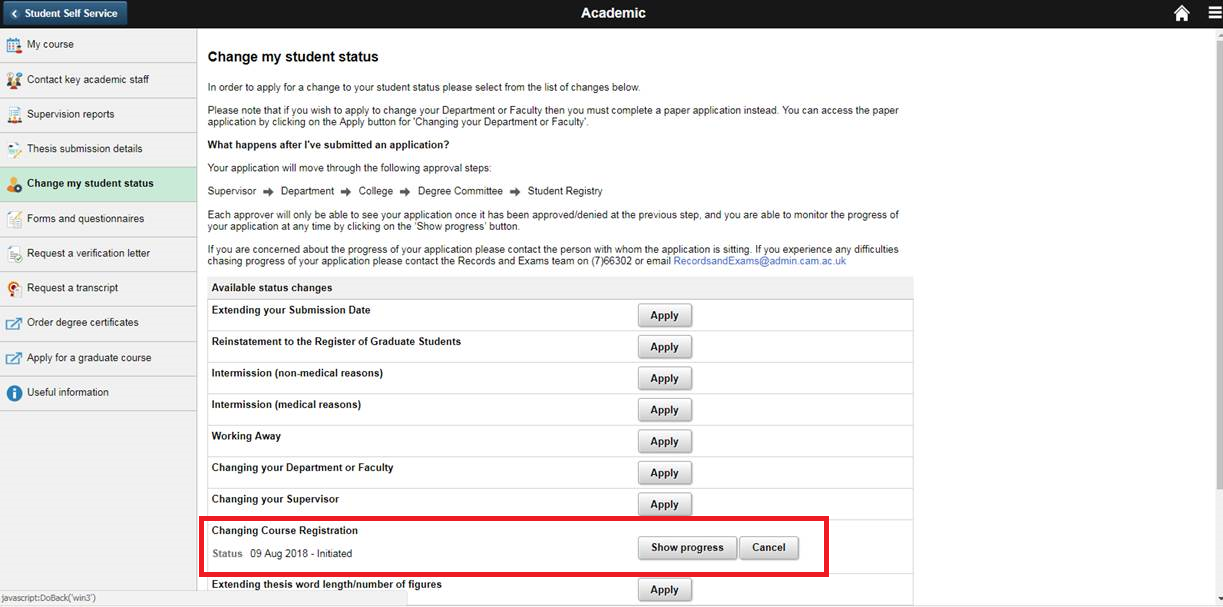
You can track the progress of your application in the ‘Change my Student Status’ section of your 'Academic' tile on CamSIS . Click here to see a screenshot.
This will take you to your pending application, where you will be able to see the stage your application is at, and read any comments made by the reviewing parties. You will also receive email notifications about the progress of your application.
How long will the application take?
It is not possible to estimate how long each reviewer will take to confirm their decision, but you should allow for at least seven days for each stage. If you are concerned that your application is not progressing as expected, you should check which stage your application is at via your self-service and contact the reviewer directly.
The outcome of your application
It is important to note that if your application does not comply with the policy of the Postgraduate Committee it will not be approved by the Student Registry. For this reason, you should make sure that you have carefully read the policy relating to the change that you are applying for before submitting your application. The Student Registry may contact you or one of the reviewing parties for more information, or to ask to you to submit supporting documents.
You will receive an email from Student Registry confirming the outcome of your application. The email will be copied to the other reviewing parties - you should read this carefully as it will include important information.
If you are not satisfied with the outcome of your application, you can request a review by contacting Student Registry. You would need to provide new information and/or evidence that was not included in your application to support your request. You can provide supporting statements from your supervisor, Department or College. Student Registry may also contact your Degree Committee or Department to ask them to provide a supporting case